

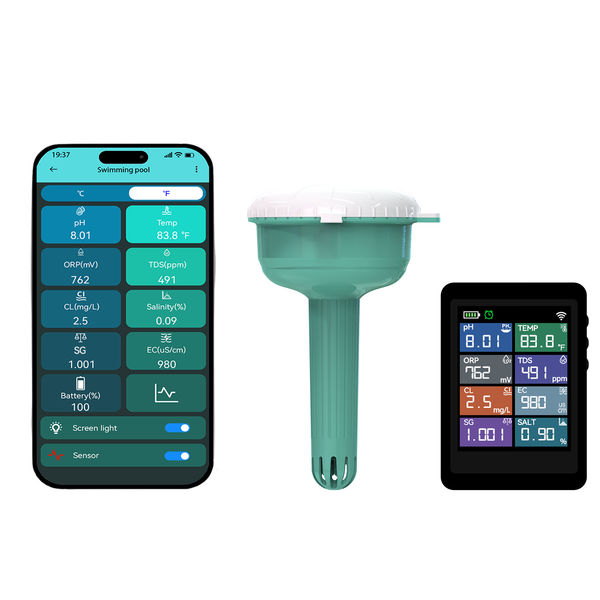
Your device
Product: Rovynel 8-in-1 LoRa Smart Pool Water Monitor
SKU: RVN-WQ8-LORA
Device type: Complete pool and spa monitoring system
What it measures
pH, free available chlorine, ORP, salinity, TDS, EC, specific gravity, and water temperature.
Check your product label and hardware revision before following a wiring, button, calibration or storage procedure. For revision-specific details, contact Rovynel Support with your model and version.
Connection and power
The floating probe sends readings to the display over LoRa. The display separately connects to the Tuya app over 2.4 GHz WiFi.
Setup and first reading
- Confirm the display, floating probe, power parts, and supplied setup or calibration materials.
- Prepare and place the floating probe only as described by the supplied model instructions.
- Power the display and confirm that probe readings reach the display over LoRa.
- Connect the display to a 2.4 GHz WiFi network, then add it in the Tuya app.
- Complete the model-specific calibration procedure before relying on alerts.
- Compare initial readings with a suitable maintained reference method and observe trends before changing pool treatment.
Placement checklist
- Keep the display dry, powered, and within usable LoRa range of the floating probe.
- Place the probe in representative circulating water, away from direct chemical-feed discharge.
- Avoid trapping bubbles on sensing surfaces and inspect for debris or scale.
First-reading checklist
- Correct product and sensor type confirmed.
- Connection path and power state confirmed.
- Sensing surfaces inspected and placed in representative conditions.
- Units checked before comparing values.
- Required stabilization time allowed.
- Calibration or verification completed using the exact model procedure.
- Initial values compared with a suitable maintained reference method.
- Baseline and review date recorded before alert thresholds are used.
Calibration and reference checks
- Use only standards, reference methods, and steps specified for the exact product revision.
- Never invent or copy buffer values, calibration pass limits, register scaling, or storage liquids from another model.
- Record the standard lot or reference, date, operator, temperature where relevant, and result.
- Rinse and handle sensing surfaces according to the exact sensor requirements.
- Repeat verification after cleaning, unusual exposure, transport, long storage, or implausible readings.
Routine care
- Inspect for deposits, biofouling, bubbles, cable damage, loose connectors, condensation, and abnormal exposure.
- Keep displays, gateways, power parts, and non-immersible connectors dry.
- Do not scrape or chemically clean sensing surfaces unless the supplied instructions permit it.
- Keep a simple maintenance log with placement, calibration, cleaning, and unusual-event notes.
Troubleshooting
- No probe data: check probe power or preparation, pairing status, and placement distance.
- App is offline: confirm 2.4 GHz WiFi coverage near the display; WiFi is not the probe-to-display link.
- Unstable readings: inspect placement, rinse the sensing surfaces, allow readings to stabilize, and repeat model-specific calibration.
- Unexpected chlorine value: Confirm the reference method and pool chemistry before treatment changes.
Safe use and limitations
- Disconnect power before wiring, opening connectors, moving powered components, or servicing an RS485 installation.
- Keep children and animals away from cables, small parts, standards, cleaning liquids, and power equipment.
- Do not use the product as the sole basis for drinking-water, medical, life-support, food-safety, or emergency decisions.
- Do not claim regulatory certification unless the exact product label and supporting document identify it.
- Use the measured channels as trends and decision inputs, not as a substitute for every required test.
This monitor supports trend awareness and pool-care decisions. It does not replace all required manual testing or determine whether water is safe to drink.
Keep a support record
When asking for help, include:
- Product model and SKU
- Purchase or order number
- Hardware or firmware version, if shown
- Date placed in service
- Last calibration or verification date and reference used
- Issue, units and observed readings
- Installation photos or controller logs, where applicable
Contact Rovynel Support about this model
Videos and related guides
- Watch the matching setup and calibration video guide
- Setup and calibration overview
- Sensor accuracy and probe care
- Frequently asked questions
- Warranty and support
Online edition 1.0. Content reorganized October 7, 2026 from the existing model support page and Quick Start and Safe Use guide. Technical specifications remain those stated in the original model documentation.