

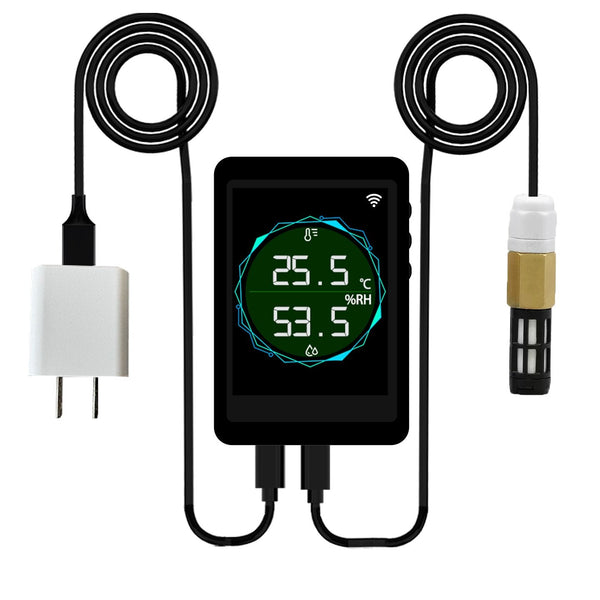
Your device
Product: WiFi Air Temperature & Humidity Monitor with Tuya App Alerts
SKU: TH-WIFI
Device type: Environmental air monitor; not a water-quality device
What it measures
Air temperature from -40 to 125 °C and relative humidity from 0 to 100% RH using a remote SHT40 probe.
Check your product label and hardware revision before following a wiring, button, calibration or storage procedure. For revision-specific details, contact Rovynel Support with your model and version.
Connection and power
Readings and alerts are available through the Tuya or Smart Life app over WiFi, with local information on the full-color LCD.
Setup and first reading
- Inspect the display, remote probe, cable, and power parts.
- Place the remote probe where it represents the environment to be monitored.
- Avoid direct sunlight, heater exhaust, humidifier discharge, condensation, and blocked airflow unless those conditions are the target.
- Power the display and connect it to 2.4 GHz WiFi and the Tuya or Smart Life app.
- Compare readings over time before setting high and low alerts.
- Document the sensor position so future comparisons use the same exposure.
Placement checklist
- Use representative height and airflow for the decision being made.
- Keep the sensor away from wetting, condensation, direct radiation, vents, doors, and local heat sources unless intentionally measured.
- When comparing instruments, place them together and allow both to stabilize.
First-reading checklist
- Confirm the product and remote air sensor.
- Confirm display power and the display-to-app connection.
- Check temperature and humidity units before comparing instruments.
- Place reference instruments together in representative conditions and allow readings to stabilize.
- Record the sensor position and normal daily variation before setting alerts.
Accuracy verification
No water-sensor calibration is required. When comparing instruments, place them together under stable conditions and allow enough response time. Differences can result from placement, airflow, heat radiation, response time, and reference-instrument accuracy.
Routine care
- Inspect cables, loose connectors, condensation, airflow and abnormal exposure.
- Keep displays, gateways, power parts, and non-immersible connectors dry.
- Do not scrape or chemically clean sensing surfaces unless the supplied instructions permit it.
- Keep a simple maintenance log with placement, calibration, cleaning, and unusual-event notes.
Troubleshooting
- Different readings: align sensor height and exposure, then allow both devices to stabilize.
- Slow response: inspect airflow and make sure the probe is not enclosed or wet.
- App is offline: confirm WiFi coverage and reconnect the monitor.
- Frequent alerts: Review placement and actual environmental cycling before changing thresholds.
Safe use and limitations
- Disconnect power before wiring, opening connectors, moving powered components, or servicing an RS485 installation.
- Keep children and animals away from cables, small parts, standards, cleaning liquids, and power equipment.
- Do not use the product as the sole basis for drinking-water, medical, life-support, food-safety, or emergency decisions.
- Do not claim regulatory certification unless the exact product label and supporting document identify it.
- Use the measured channels as trends and decision inputs, not as a substitute for every required test.
Keep a support record
When asking for help, include:
- Product model and SKU
- Purchase or order number
- Hardware or firmware version, if shown
- Date placed in service
- Last calibration or verification date and reference used
- Issue, units and observed readings
- Installation photos or controller logs, where applicable
Contact Rovynel Support about this model
Related guides
Online edition 1.0. Content reorganized October 7, 2026 from the existing model support page and Quick Start and Safe Use guide. Technical specifications remain those stated in the original model documentation.